利用docker对一个Springboot打包时会遇到要及时更改相关数据库或者外部接口的ip及port,如果每次都进到容器内部修改,那一定非常麻烦,这里我想到了两种解决方案,并最终使用了后者。两种方法类似,无论哪种,都必须经过外挂载的步骤,也就是要把配置文件放到一个和宿主机映射的目录下:如图,这里采用的是docker-compose.yaml容器编排方式,不赘述:
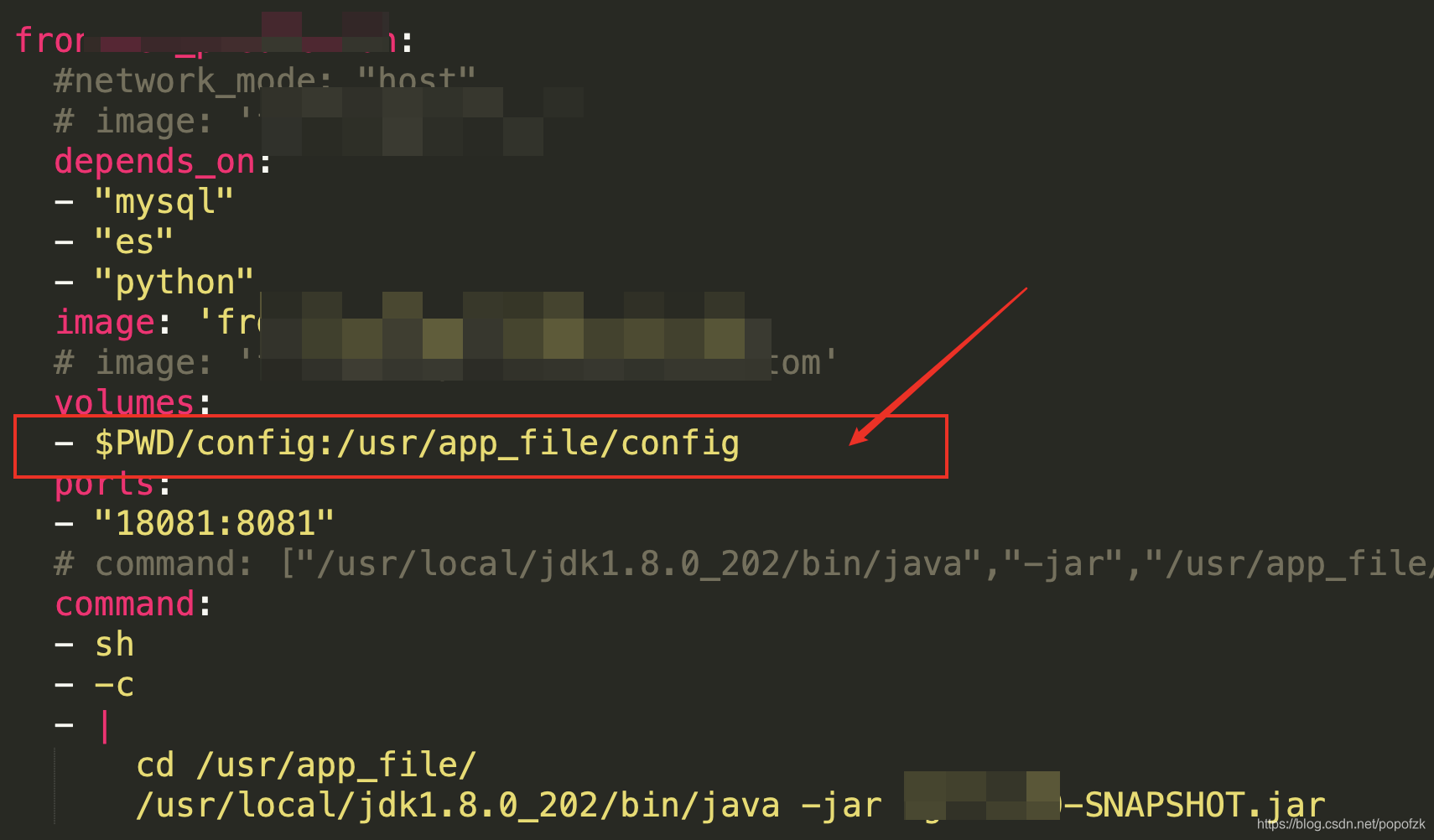
将配置文件放在宿主机目录的config下,代码中写到“/usr/app_file/config/config/json”即可被容器访问到!
方法一:
容器内运行jar包的CMD采用指定外部application.yml的命令:
类似:
1
| nohup jdk1.8.0_131/bin/java -jar -Dspring.config.location=tmp/springboottmp/xxx.yaml tmp/service.jar --spring.profiles.active=test > logs/xxxlog.log 2>&1 &
|
方法二:
不使用application.yml,用最原始的方式读取一个json文件的键值对,并替换代码变量即可,在Springboot config下定义一个JsonConfig类即可,代码简单,关键是要把地址写到容器内的与宿主机映射的外挂载目录下
1
2
3
4
5
6
7
8
9
10
11
12
13
14
15
16
17
18
19
20
21
22
23
24
25
26
27
28
29
30
31
32
33
34
35
36
37
38
39
40
41
42
43
44
| @Component
public class JsonConfig {
public String getProperty(String name) {
String json_file = "/usr/app_file/config/es.json";
JSONObject configJ = this.readJsonFile(json_file);
if(configJ.containsKey(name)){
return configJ.getString(name);
}
return null;
}
public JSONObject readJsonFile(String filePath){
BufferedReader reader = null;
String readJson = "";
try {
FileInputStream fileInputStream = new FileInputStream(filePath);
InputStreamReader inputStreamReader = new InputStreamReader(fileInputStream, "UTF-8");
reader = new BufferedReader(inputStreamReader);
String tempString = null;
while ((tempString = reader.readLine()) != null){
readJson += tempString;
}
}catch (Exception e){
e.printStackTrace();
}finally {
if (reader != null){
try {
reader.close();
}catch (Exception e){
e.printStackTrace();
}
}
}
JSONObject jsonObject = new JSONObject();
try {
jsonObject = JSONObject.parseObject(readJson);
}catch (JSONException e){
e.getMessage();
}
return jsonObject;
}
}
|