JD商城实战
新建Springboot initializr项目
导入es、fastjson等pom下的依赖
爬虫
数据问题?数据库获取,消息队列中获取,都可以成为数据源,或者爬虫
爬取数据:(获取请求返回的页面信息,筛选出我们想要的数据就可以了)
jsoup包:用于解析网页,不能爬电影
新建一个utils包放网页解析的工具类

本质的请求是:
https://search.jd.com/Search?keyword=java

所有在Js中的方法这里都可以使用
1
2
3
4
5
6
7
8
9
10
11
12
13
14
15
16
17
18
19
20
21
22
23
24
25
26
27
28
29
30
31
32
33
| package com.kun.utils;
import org.jsoup.Jsoup;
import org.jsoup.nodes.Document;
import org.jsoup.nodes.Element;
import java.io.IOException;
import java.net.MalformedURLException;
import java.net.URL;
public class HtmlParseUtil {
public static void main(String[] args) throws IOException {
String url = "https://search.jd.com/Search?keyword=java";
Document document = Jsoup.parse(new URL(url), 30000);
Element element = document.getElementById("J_goodsList");
System.out.println(element.html());
Elements elements = element.getElementsByTag("li");
for (Element el : elements) {
String img = el.getElementsByTag("img").eq(0).attr("src");
String price = el.getElementsByClass("p-price").eq(0).text();
String title = el.getElementsByClass("p-name").eq(0).text();
System.out.println("===============================");
System.out.println(img);
System.out.println(price);
System.out.println(title);
}
}
|

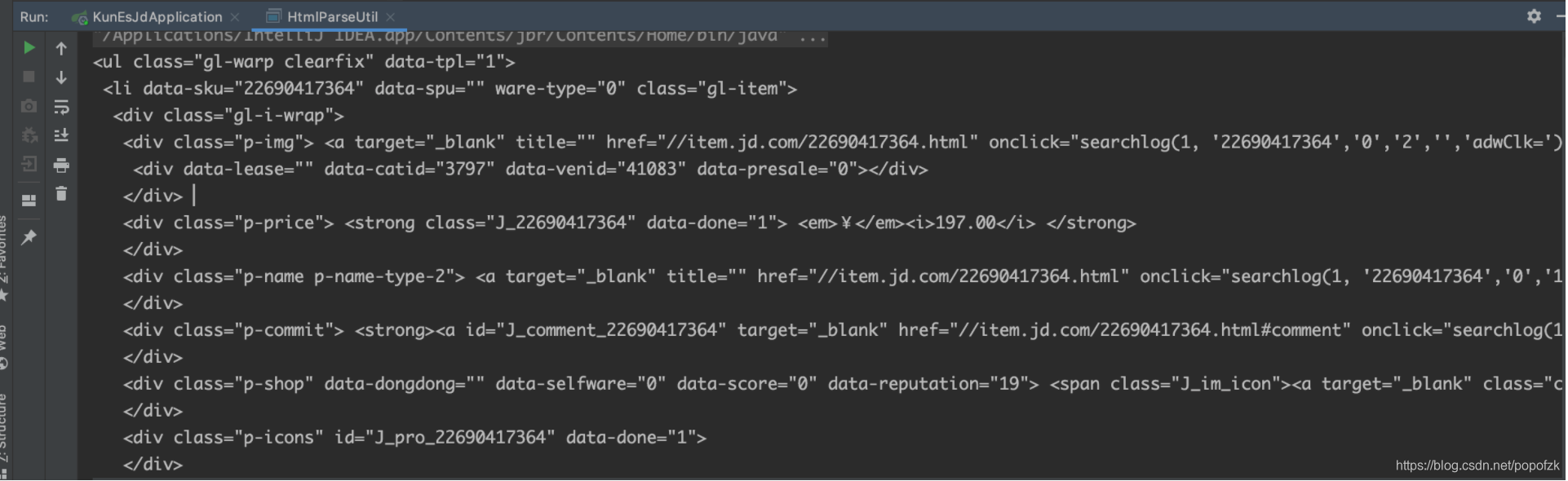

输出结果

注意:
在图片较多的网站中,图片往往是延迟加载的,注意看图片的属性:

将获取到的元素 封装成对象,新建pojo,Content.java
1
2
3
4
5
6
7
8
9
10
11
12
13
14
15
| package com.kun.pojo;
import lombok.AllArgsConstructor;
import lombok.Data;
import lombok.NoArgsConstructor;
@Data
@NoArgsConstructor
@AllArgsConstructor
public class Content {
private String title;
private String img;
private String price;
}
|
再次封装工具类:
1
2
3
4
5
6
7
8
9
10
11
12
13
14
15
16
17
18
19
20
21
22
23
24
25
26
27
28
29
30
31
32
33
34
35
36
37
38
39
40
41
42
43
44
45
46
47
48
49
50
51
52
53
| package com.kun.utils;
import com.kun.pojo.Content;
import org.jsoup.Jsoup;
import org.jsoup.nodes.Document;
import org.jsoup.nodes.Element;
import org.jsoup.select.Elements;
import java.io.IOException;
import java.net.MalformedURLException;
import java.net.URL;
import java.util.ArrayList;
import java.util.List;
@Component
public class HtmlParseUtil {
public static void main(String[] args) throws Exception {
new HtmlParseUtil().parseJD("java").forEach(System.out::println);
}
public List<Content> parseJD(String keywords) throws Exception {
String url = "https://search.jd.com/Search?keyword=" + keywords;
Document document = Jsoup.parse(new URL(url), 30000);
Element element = document.getElementById("J_goodsList");
Elements elements = element.getElementsByTag("li");
ArrayList<Content> goodsList = new ArrayList<Content>();
for (Element el : elements) {
String img = el.getElementsByTag("img").eq(0).attr("src");
String price = el.getElementsByClass("p-price").eq(0).text();
String title = el.getElementsByClass("p-name").eq(0).text();
Content content = new Content();
content.setImg(img);
content.setPrice(price);
content.setTitle(title);
goodsList.add(content);
}
return goodsList;
}
}
|
编写业务层service:
1
2
3
4
5
6
7
8
9
10
11
12
13
14
15
16
17
18
19
20
21
22
23
24
25
26
27
28
29
30
31
32
33
34
35
36
37
38
39
40
| package com.kun.service;
import com.alibaba.fastjson.JSON;
import com.kun.pojo.Content;
import com.kun.utils.HtmlParseUtil;
import org.elasticsearch.action.bulk.BulkRequest;
import org.elasticsearch.action.bulk.BulkResponse;
import org.elasticsearch.action.index.IndexRequest;
import org.elasticsearch.client.RequestOptions;
import org.elasticsearch.client.RestHighLevelClient;
import org.elasticsearch.common.xcontent.XContentType;
import org.springframework.beans.factory.annotation.Autowired;
import org.springframework.context.annotation.Bean;
import org.springframework.stereotype.Service;
import java.util.List;
@Service
public class ContentService {
@Autowired
private RestHighLevelClient restHighLevelClient;
public Boolean parseContent(String keywords) throws Exception {
List<Content> contents = new HtmlParseUtil().parseJD(keywords);
BulkRequest bulkRequest = new BulkRequest();
bulkRequest.timeout("2m");
for (int i = 0; i < contents.size(); i++) {
bulkRequest.add(
new IndexRequest("jd_goods")
.source(JSON.toJSONString(contents.get(i)), XContentType.JSON));
}
BulkResponse bulk = restHighLevelClient.bulk(bulkRequest, RequestOptions.DEFAULT);
return !bulk.hasFailures();
}
}
|
测试:由于这个文件中又Autowire,所以就算建了主函数psvm,也不能测,必须启动服务;
直接用controller来测:
1
2
3
4
5
6
7
8
9
10
11
12
13
14
15
16
17
18
19
| package com.kun.controller;
import com.kun.service.ContentService;
import org.springframework.beans.factory.annotation.Autowired;
import org.springframework.web.bind.annotation.GetMapping;
import org.springframework.web.bind.annotation.PathVariable;
import org.springframework.web.bind.annotation.RestController;
@RestController
public class ContentController {
@Autowired
private ContentService contentService;
@GetMapping("/parse/{keyword}")
public Boolean parse(@PathVariable("keyword") String keywords) throws Exception {
return contentService.parseContent(keywords);
}
}
|
再在业务层中实现搜索功能:
1
2
3
4
5
6
7
8
9
10
11
12
13
14
15
16
17
18
19
20
21
22
23
24
25
|
public List<Map<String,Object>> searchPage(String keyword,int pageNo,int pageSize) throws IOException {
if(pageNo<=1){
pageNo = 1;
}
SearchRequest searchRequest = new SearchRequest("jd_goods");
SearchSourceBuilder sourceBuilder = new SearchSourceBuilder();
sourceBuilder.from(pageNo);
sourceBuilder.size(pageSize);
TermQueryBuilder termQueryBuilder = QueryBuilders.termQuery("title", keyword);
sourceBuilder.query(termQueryBuilder);
sourceBuilder.timeout(new TimeValue(60, TimeUnit.SECONDS));
searchRequest.source(sourceBuilder);
SearchResponse searchResponse = restHighLevelClient.search(searchRequest, RequestOptions.DEFAULT);
ArrayList<Map<String,Object>> list = new ArrayList<>();
for (SearchHit documentFields : searchResponse.getHits().getHits()) {
list.add(documentFields.getSourceAsMap());
}
return list;
}
|
用Controller来测:
1
2
3
4
5
6
| @GetMapping("/parse/{keyword}/{pageNo}/{pageSize}")
public List<Map<String,Object>> search(@PathVariable("keyword") String keyword,
@PathVariable("pageNo")int pageNo,
@PathVariable("pageSize") int pageSize) throws IOException {
return contentService.searchPage(keyword, pageNo, pageSize);
}
|
前后端分离
先在一个任意包下npm install vue生成vue文件,将内部一些js包导入Springboot项目中;axios.min.js;vue.min.js


在前端每个商品中得到result值

搜索高亮
修改业务层ContentService.java
1
2
3
4
5
6
7
8
9
10
11
12
13
14
15
16
17
18
19
20
21
22
23
24
25
26
27
28
29
30
31
32
33
34
35
36
37
38
39
40
41
42
43
44
45
46
47
48
49
50
51
52
|
public List<Map<String,Object>> searchPageHighlightBuilder(String keyword,int pageNo,int pageSize) throws Exception {
parseContent(keyword);
if (pageNo <= 1) {
pageNo = 1;
}
SearchRequest searchRequest = new SearchRequest("jd_goods");
SearchSourceBuilder sourceBuilder = new SearchSourceBuilder();
sourceBuilder.from(pageNo);
sourceBuilder.size(pageSize);
MatchQueryBuilder matchQueryBuilder = new MatchQueryBuilder("title", keyword);
sourceBuilder.query(matchQueryBuilder);
sourceBuilder.timeout(new TimeValue(60, TimeUnit.SECONDS));
HighlightBuilder highlightBuilder = new HighlightBuilder();
highlightBuilder.field("title");
highlightBuilder.requireFieldMatch(false);
highlightBuilder.preTags("<span style='color:red'>");
highlightBuilder.postTags("</span>");
sourceBuilder.highlighter(highlightBuilder);
searchRequest.source(sourceBuilder);
SearchResponse searchResponse = restHighLevelClient.search(searchRequest, RequestOptions.DEFAULT);
ArrayList<Map<String, Object>> list = new ArrayList<>();
for (SearchHit hit : searchResponse.getHits().getHits()) {
Map<String, HighlightField> highlightFields = hit.getHighlightFields();
HighlightField title = highlightFields.get("title");
Map<String, Object> sourceAsMap = hit.getSourceAsMap();
if (title != null) {
Text[] fragments = title.fragments();
String n_title = "";
for (Text text : fragments) {
n_title += text;
}
sourceAsMap.put("title", n_title);
}
list.add(sourceAsMap);
}
return list;
}
|
效果